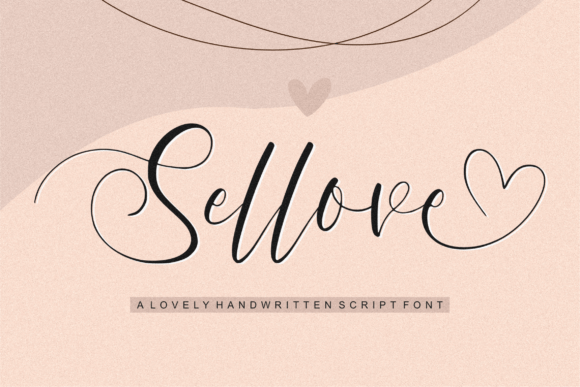
Sellove: A Dazzling Script Font for Web Design
As a web designer, finding the perfect typeface to elevate your digital projects is crucial. Sellove, a meticulously crafted script font, offers a unique blend of elegance and personality that can transform any design. Its detailed and neat appearance makes it an excellent addition to your font library, enhancing both visual appeal and user engagement.
Visual Characteristics and Personality
Sellove boasts a flowing, handwritten style with a touch of modern sophistication. The font's clean lines and well-defined curves give it a polished yet approachable feel, making it ideal for a wide range of digital applications. Whether you're designing a creative portfolio, a boutique online store, or a coaching website, Sellove adds a distinctive flair that captures attention and leaves a lasting impression.
Enhancing Website Headers and Hero Sections
One of the most impactful uses of Sellove is in website headers and hero sections. Its bold and elegant presence can instantly set the tone for the entire site. For instance, using Sellove in a full-screen hero image with a subtle overlay can create a visually striking and memorable first impression. This is particularly effective for luxury brands, high-end services, and creative portfolios where a strong, sophisticated look is essential.
Boosting Readability and Visual Hierarchy
While Sellove is a decorative script font, it still maintains a level of readability that makes it suitable for various elements on a webpage. For optimal readability, use Sellove for short, impactful phrases like headlines, subheadings, and call-to-action buttons. Pairing it with a simple sans serif font for body text ensures that the overall layout remains clear and easy to scan. This combination enhances the visual hierarchy, guiding users through the content seamlessly.
Perfect for Call-to-Action Areas and Buttons
Incorporating Sellove into call-to-action (CTA) areas and buttons can significantly boost their effectiveness. The font's stylish and inviting nature draws the eye, encouraging users to take action. For example, using Sellove for a CTA button on a product landing page or a course sales page can make the button stand out, increasing the likelihood of conversions. Just ensure the font size and color provide enough contrast against the background for optimal visibility.
Creating Engaging Online Shop Banners and Blog Graphics
Sellove's versatility extends to creating engaging banners and graphics for online shops and blogs. Use it for promotional banners, sale announcements, and blog post headers to add a touch of creativity and professionalism. The font's dynamic and lively appearance can help these elements stand out, driving more traffic and engagement. For blog graphics, pairing Sellove with a complementary serif or sans serif font can create a balanced and visually appealing design.
Supporting Brand Identity and Consistency
A consistent brand identity is vital for building trust and recognition. Sellove can play a significant role in establishing and maintaining this consistency across all digital platforms. Use it for logo text, branded content, and social media graphics to create a cohesive and recognizable brand presence. The font's unique style helps to reinforce the brand's personality and values, making it an invaluable asset for any digital branding strategy.
Practical Considerations for Mobile and Responsive Layouts
When using Sellove in mobile and responsive layouts, it's important to consider its legibility at smaller sizes. While the font is highly detailed, it may not be as readable on very small screens. For mobile designs, use Sellove sparingly for key elements like headings and CTAs, and opt for a more legible font for body text. Additionally, test the font on different devices and screen sizes to ensure it looks great and performs well across all platforms.
Font Pairing for a Balanced Design
To create a balanced and harmonious design, pair Sellove with simpler, more legible fonts. A classic combination is using Sellove for headlines and a clean sans serif font like Arial or Helvetica for body text. For a more editorial look, consider pairing Sellove with a serif font such as Georgia or Times New Roman. This mix of styles adds depth and variety to your design, while maintaining clarity and readability.
Checking Included Styles and Formats
Before incorporating Sellove into your projects, check the included styles and formats. Most premium fonts come with a variety of weights and alternates, allowing you to customize the look and feel. Ensure the font supports the necessary file formats, such as OTF, TTF, and webfont versions, to cover all your design needs. Additionally, verify that the font includes multilingual support if you plan to use it for international projects.
Commercial Licensing for Web Design Projects
When using Sellove for commercial projects, it's important to review the licensing terms. Most premium fonts require a specific license for use in websites, client projects, and digital products. Make sure to purchase the appropriate license to avoid any legal issues. This is especially important for online stores, landing pages, and digital templates where the font will be used extensively and potentially distributed to a wide audience.
By integrating Sellove into your web design toolkit, you can create visually stunning and engaging digital experiences. Its unique style, combined with thoughtful application, can elevate your projects and leave a lasting impression on your audience. Whether you're designing a creative portfolio, an e-commerce site, or a brand-focused web experience, Sellove is a versatile and powerful choice.